
WiFi Site Surveys
A WiFi site survey measures how your wireless network actually performs across your building — signal strength, interference, capacity and throughput — and tells you exactly where access points should go. We run predictive surveys from a floorplan (from £500) and onsite active and passive surveys using Ekahau Sidekick hardware (from £1,000). We've completed over 50 surveys.
What is a WiFi site survey?
A WiFi site survey maps the real wireless performance across a physical space rather than guessing from a floorplan or an access point count. It identifies dead zones, co-channel interference, capacity bottlenecks and roaming problems, and produces a report showing where access points should be placed, on which channels, and at what power.
Most WiFi problems are design problems, not equipment problems
Adding more access points to a badly designed network usually makes it worse, because it increases co-channel interference. Before you spend money on new hardware, it's worth knowing whether the hardware is actually the problem — most of the time, it isn't.
Predictive or onsite — which do you need?
Predictive (simulated) survey
From £500
- You supply a floorplan; we model AP placement, channel plan and power levels.
- Best for new fit-outs, office moves, buildings that don't exist yet, and budgeting.
- It's a model. Real building materials, unexpected interference and actual client behaviour can differ from the simulation.
Onsite survey (active and passive)
From £1,000
- We walk the building with Ekahau Sidekick hardware, taking real measurements.
- Passive: listens to what's actually broadcasting — signal, noise, interference and channel overlap.
- Active: connects to the network and measures real throughput, roaming behaviour and packet loss.
- Best for diagnosing existing problems, validating a new install, or auditing coverage.
If you're fitting out a new space, predictive is usually the right starting point and costs less. If your WiFi is already bad, predictive won't tell you why — you need onsite.
What you get
You get a full report generated in Ekahau AI Pro, measured against Ekahau Best Practice thresholds. Every metric below is shown as a heatmap laid over your floorplan, so you can see exactly where the network passes and where it fails.
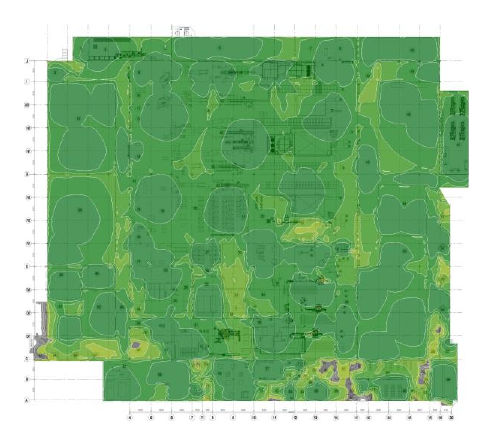
Green is healthy headroom above noise; grey areas are where the signal sits too close to the noise floor.
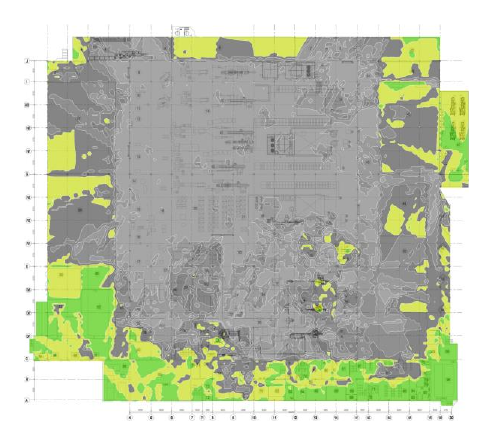
Green means one clean access point per area; grey shows where several overlap on the same channel and fight each other.
Real heatmaps from the example report — a 12,511 m² processing plant surveyed with Ekahau. Your own report covers every metric listed below.
Signal strength (2.4, 5 & 6 GHz)
Coverage across every band. Low signal strength means unreliable connections and low throughput.
Secondary & tertiary signal strength
The second and third strongest signal at each point — this is what determines whether devices roam smoothly and whether VoIP calls survive moving between access points.
Signal-to-noise ratio (SNR)
How far the signal sits above background interference. If signal is only barely above noise, you get intermittent drop-offs.
Channel interference & noise
How many access points overlap on a single channel at each location, and the calculated co-channel interference level.
Data rate & measured throughput
The negotiated link speed and the actual throughput measured on site, not a theoretical maximum.
Capacity health
Whether the network holds up against a defined client load — in the example, 100 concurrent devices needing 600 Mbps.
Network health (pass/fail)
A single pass/fail overlay showing whether each area meets requirements, with a companion view showing exactly why an area fails.
Access point schedule
A full AP-by-AP schedule listing channel and transmit power per radio, plus Bluetooth coverage and channel-width availability.
Measured against Ekahau Best Practice thresholds
See a real example report
No form, no email required. The example is a 12,511 m² processing plant modelled with 83 access points — a typical office survey is considerably smaller.
The equipment we use
We survey with Ekahau Sidekick and Ekahau AI Pro. A laptop's WiFi adapter and a free phone app can show you rough signal strength, but they can't measure spectrum interference, can't capture across all bands simultaneously, and can't produce measurements accurate enough to design a network from. Dedicated hardware is the difference between a guess and a design.
What is the Ekahau Sidekick?
What a WiFi site survey costs
Most providers hide behind a quote form. Here are our starting prices up front.
| Survey type | Price | What that covers |
|---|---|---|
| Predictive (from floorplan) | From £500 | Half a day of project labour: AP placement model, channel plan, power levels and a full report. |
| Onsite (active and passive) | From £1,000 | One full day at our standard £1,000 day rate: onsite measurement with Ekahau Sidekick, plus the report. |
What moves the price
- Total floor area and how much of the site needs coverage
- Number of floors and separate buildings
- Travel to and from your site
- Whether you need a post-install validation survey as well as a pre-install design
A worked example
A single-floor office of roughly 40 staff typically sits at the entry point — one day onsite, or a predictive survey from the floorplan. A multi-floor or multi-building site runs to two or more days.
Anything beyond a straightforward single site gets quoted after a conversation — a 20-person office and a warehouse complex are not the same job.
When you don't need a survey
A survey isn't always the right spend. Here's when we'd tell you to save your money.
A small, single-floor office with no complaints
A single open-plan floor with three or four access points and no problems probably doesn't need a survey.
The problem is one specific application
If a single app misbehaves while everything else is fine, it may be the application or your internet connection rather than the wireless. The exception is voice — dropped Teams or VoIP calls usually are a WiFi problem, specifically how devices hand over between access points.
You already know you're replacing the hardware
If your access points are 6–7 years old, replacement is coming regardless. Don't pay for a full onsite survey of kit you're about to remove — but do get a predictive survey as part of the replacement, or you'll reinstall the same design with newer hardware.
You've just moved in and nothing is installed
A predictive survey from the floorplan is enough — don't pay for an onsite survey of an empty space.
Where we work
We're based in Bishop's Stortford and work across Hertfordshire, Essex, London and Cambridgeshire as standard. We also carry out surveys anywhere in the UK — we've surveyed sites well outside our home region. For sites further afield we add a travel charge, which we'll confirm in the quote before any work is booked. If you're outside the South East, ask — the answer is usually yes.
WiFi site survey questions, answered
How much does a WiFi site survey cost?
A predictive survey from a floorplan starts at £500 (about half a day of project labour). An onsite active and passive survey starts at £1,000, which is one full day at our standard day rate including the report. A straightforward single-floor office of around 40 staff typically sits at the entry point; multi-floor or multi-building sites run to two or more days and are quoted after a conversation.
What's the difference between a predictive and an onsite WiFi survey?
A predictive survey models AP placement, channel plan and power levels from your floorplan before anything is installed — ideal for new fit-outs, office moves and budgeting. An onsite survey measures the real network in your actual building with Ekahau Sidekick hardware. If you're fitting out a new space, predictive is usually the right starting point and costs less. If your WiFi is already bad, predictive won't tell you why — you need onsite.
What's the difference between an active and a passive survey?
A passive survey listens to what's actually broadcasting — signal strength, noise, interference and channel overlap. An active survey connects to the network and measures real throughput, roaming behaviour and packet loss. An onsite survey includes both.
How long does a WiFi site survey take?
A predictive survey is roughly half a day of project labour. A straightforward onsite survey of a single site is typically one full day on site plus report writing. Larger or multi-site jobs take two or more days depending on floor area and how many buildings need coverage.
What's included in the report?
Signal strength across 2.4, 5 and 6 GHz, secondary and tertiary signal strength, signal-to-noise ratio, channel interference and noise, data rate and measured throughput, capacity health against a defined client load, a pass/fail network health overlay showing why areas fail, Bluetooth coverage, channel-width availability, and a full access point schedule with channel and transmit power per radio — all measured against Ekahau Best Practice thresholds.
Do I need a survey before installing new access points?
For a new fit-out, a predictive survey first will save money by getting AP placement, channels and power right before anything is mounted. For an existing network that's underperforming, an onsite survey tells you why. Most WiFi problems are design problems, not equipment problems — adding more access points to a badly designed network usually makes things worse.
Can you survey a site outside Hertfordshire and Essex?
Yes. We're based in Bishop's Stortford and work across Hertfordshire, Essex, London and Cambridgeshire as standard, but we carry out surveys anywhere in the UK. For sites further afield we add a travel charge, which we confirm in the quote before any work is booked.
What equipment do you use?
Ekahau Sidekick and Ekahau AI Pro. Dedicated survey hardware measures spectrum interference and captures across all bands simultaneously with the accuracy needed to design from — something a laptop's WiFi adapter and a free phone app simply can't do.
Book a WiFi survey conversation
Tell us about your building and what's going wrong. We'll tell you honestly whether a predictive or onsite survey is the right call — or whether you need one at all.